Each DSLR camera has a variety of features that makes photography even more fun and creative. We choose a camera to buy and use based on our wants and needs. There are a lot of features to consider and one of the most important is the pixel count. Cameras with a large number of pixels are more sensitive to light and that can help to produce a better image quality. But which DSLR camera stands out from the rest in terms of jaw-dropping image quality?
The Nikon D810 offers a massive 36.3 effective megapixels to flawlessly capture every shot you’ll take. The clarity of detail and the rich colors in each photo is simply amazing with Nikon’s innovative EXPEED 4 image processing. It offers unsurpassed detail retention, noise-free images from ISO 64 to 12,800, and well-saturated skin tones. The D810 captures 5 fps at full resolution in FX format that widens the range of shooting situations.
This camera is perfect for still and multimedia photographers including professionals in landscape, studio, wedding, and portrait photography. Cinematographers and camera operators will surely love the D810 because of its accurate autofocus, smaller file formats, fast frame rates and image processing, and outstanding energy efficiency that will let them create their masterpiece. If you are looking for the best in DSLR image quality, choose Nikon D810. Purchase one now at SLRHut and check out other digital cameras in great prices.
Tuesday, June 23, 2015
Monday, June 22, 2015
The Intuitive DSLR Camera
Are you looking for your first entry-level camera? There are a lot to choose from and each one offers a feature you simply can’t ignore. Deciding which camera to buy is a big decision to make because we all know that DSLRs are expensive, so you want to make the right choice. Since you are starting out with photography, you want a camera that’s easy to use and understand without the lack of the features you want in a camera.
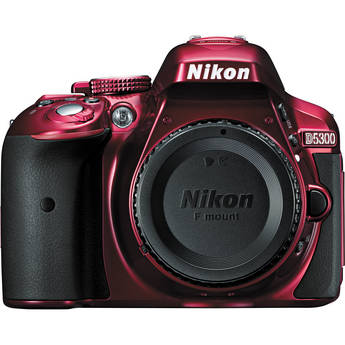
The Nikon D5300 is an entry-level camera and the successor to the Nikon D5200, with a few minor changes. This camera offers amazingly sharp and vivid details in photos thanks to its high pixel count of 24.2MP and EXPEED 4 processing engine that gives photos and videos an exquisite color. You can expect less noise, good tones and true blacks, even when shooting in low-light situations. Its ISO sensitivity ranges from 100 to 12800, and can extend up to ISO 25600 equivalent. The Nikon D5300 has built-in Wi-Fi that lets you share your photos with just a few easy steps, all you need is your camera and smart device.
With its 39-point AF system, you’ll never miss a good shot, even when your subject is not in the center of the frame. The Nikon D5300 has a vari-angle monitor that lets you be more creative in unique angles. Shoot from a low and high angle or take a selfie. Get creative with the Nikon D5300. You can choose from black, red, or gray models to match your style. Ready to order? Head on over to SLRHut for a great deal on the Nikon D5300 and other digital cameras as well.
The Nikon D5300 is an entry-level camera and the successor to the Nikon D5200, with a few minor changes. This camera offers amazingly sharp and vivid details in photos thanks to its high pixel count of 24.2MP and EXPEED 4 processing engine that gives photos and videos an exquisite color. You can expect less noise, good tones and true blacks, even when shooting in low-light situations. Its ISO sensitivity ranges from 100 to 12800, and can extend up to ISO 25600 equivalent. The Nikon D5300 has built-in Wi-Fi that lets you share your photos with just a few easy steps, all you need is your camera and smart device.
With its 39-point AF system, you’ll never miss a good shot, even when your subject is not in the center of the frame. The Nikon D5300 has a vari-angle monitor that lets you be more creative in unique angles. Shoot from a low and high angle or take a selfie. Get creative with the Nikon D5300. You can choose from black, red, or gray models to match your style. Ready to order? Head on over to SLRHut for a great deal on the Nikon D5300 and other digital cameras as well.
Monday, June 1, 2015
Your Handy Selfie Camera
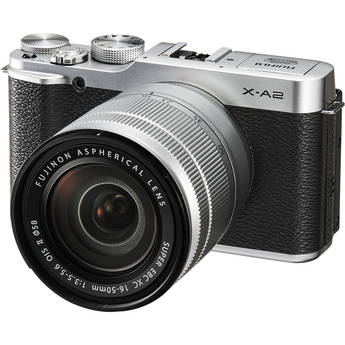
Ready to take selfies to a higher level? Fujifilm’s X-A2 is an entry-level, high performance compact digital camera designed to take better self-portraits. Its 175° tilting LCD screen with face and eye detection offers you ease and fun while you take snaps. Also, the Portrait Enhancer on the mode dial can enhance your skin making it look brighter and smoother. No need to retouch your makeup.
This camera offers much more too. Its excellent image quality will get you hooked on taking landscapes, macro shots, low-light, and flash photography. The Auto Macro function will let you capture small objects just 15cm away from the sensor to give them a larger perspective. X-A2 offers an intelligent AF that delivers fast focusing even in tricky situations, such as macro shots and in low-light conditions.
The multi-target auto area AF feature of the X-A2 lets you capture your subject easily. The camera uses multiple focusing points to identify your intended subject, making it stand out and blurring the rest. Lastly, Fujifilm’s X-A2’s wireless image transfer and insta share SP-1 printing makes sharing your photos easier. Don’t wait any longer, order your Fujifilm X-A2 today and start taking amazing selfie shots. Visit SLRHut now for the best deals on digital cameras!
This camera offers much more too. Its excellent image quality will get you hooked on taking landscapes, macro shots, low-light, and flash photography. The Auto Macro function will let you capture small objects just 15cm away from the sensor to give them a larger perspective. X-A2 offers an intelligent AF that delivers fast focusing even in tricky situations, such as macro shots and in low-light conditions.
The multi-target auto area AF feature of the X-A2 lets you capture your subject easily. The camera uses multiple focusing points to identify your intended subject, making it stand out and blurring the rest. Lastly, Fujifilm’s X-A2’s wireless image transfer and insta share SP-1 printing makes sharing your photos easier. Don’t wait any longer, order your Fujifilm X-A2 today and start taking amazing selfie shots. Visit SLRHut now for the best deals on digital cameras!
Saturday, May 16, 2015
The Tough Camera for Your Next Adventure
Ever wished for a camera that can handle extreme adventures without breaking? Look no further, because Olympus has engineered the Stylus Tough TG-850, a durable outdoor camera that’s waterproof ( to 33 feet), crushproof (to 220 pounds), freezeproof (to 10°C/14°F), and shockproof (to 7 feet) when the LCD flip screen is closed. And that’s just a few of its awesome features that will surely thrill you.
TG-850 has a tilting LCD monitor that makes capturing photos from unusual angles a whole lot easier. Mount it on your board or bike and take awesome action selfies. TG-850’s super-wide 21mm lens feature lets you capture more of what you are seeing. This panoramic feature is perfect for your outdoor adventures. Shoot a full HD 60p video and take photos in DSLR-quality.
What’s even more fun about TG-850? It provides an array of creative tools to enhance your photos and videos right away. From interval shooting to Art, Magic, and Picture filters to use, you can get really creative. Can’t wait to get your hands on this built to last camera? Head on over to SLRHut now for the best deals on digital cameras.
TG-850 has a tilting LCD monitor that makes capturing photos from unusual angles a whole lot easier. Mount it on your board or bike and take awesome action selfies. TG-850’s super-wide 21mm lens feature lets you capture more of what you are seeing. This panoramic feature is perfect for your outdoor adventures. Shoot a full HD 60p video and take photos in DSLR-quality.
What’s even more fun about TG-850? It provides an array of creative tools to enhance your photos and videos right away. From interval shooting to Art, Magic, and Picture filters to use, you can get really creative. Can’t wait to get your hands on this built to last camera? Head on over to SLRHut now for the best deals on digital cameras.
Wednesday, April 8, 2015
A New Perspective
Owning a quadcopter and using it to take shots around London is a very exciting thing to do. However, flying a drone takes skill; you will often have a few problems when you first start flying your drone. What you need to go on is training and guidance. Here are some tips regarding how to fly your drone so you can capture more videos effectively on your next session:
The Manual Mode
First rule: Do not go manual if you are not fully knowledgeable in flying your drone. The manual mode is meant for expert drone pilots. In the manual mode, the systems that are put in place to help you fly your drone easier will be disabled and you’ll lose the extra stability you need for flying. If you feel that the time has come for you to fly in manual mode, find a place that is safe for your drone.Mind the Wind
Wind is a common enemy of drones. If you notice that 8-15 kilometer per hour winds are blowing outside, it is advisable to not continue with your drone flying session. However, there are some copters with automatic corrections to adjust for wind conditions. As a general rule, always check your drone first and see if it’s fit for flying in strong windy conditions.Monday, March 16, 2015
See London from a Better Perspective
Drones have become more and more popular for photographers around the city. However, this excitement and popularity does not entice most people, especially the members of Scotland Yard who issued a warning to the new owners of drones not to fly their machines around central London.
But having this warning should not stop photographers and drone owners from capturing the city in its full beauty. Having a drone is not wrong, if you use it properly.
Always be aware of these regulations, and keep in mind that the rules are only there to keep everyone safe. Happy flying!
Area
When using your drones, you should first be focused on where you will fly it. Knowing the proper spots for drone use will help you capture videos and pictures without worrying about legal cases and concerns. You can only fly your drones that are within the line of your sight; that is usually 500 meters horizontally and 400 feet vertically. Also, you are not allowed to use your drone around the “line of sight” rule by enlisting the the help of spotters; the drone must be in the line of sight of the person directly controlling it. Flying your drone within 150 metres of any congested area and within 150 metres of an outdoor assembly of more than 1000 people is also not allowed.Always be aware of these regulations, and keep in mind that the rules are only there to keep everyone safe. Happy flying!
Tuesday, March 3, 2015
A Bird’s Eye View of London
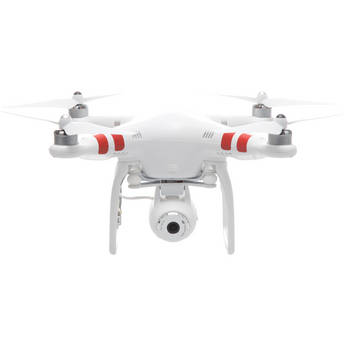
The first thing you want to consider when you have a DJI Phantom 2 Quadcopter as part of your collection is where to fly it over. After all, you are the captain of your own Quadcopter and a photographer. There are many scenic views in London, and many tourist attractions that are worth hovering over using the Phantom 2. Snapping pictures or even recording quality videos from all angles and heights are a breeze and a joy to endeavour upon with this gadget in your hands.Top 3 Attractions Worth Capturing in Film
The hustle and bustle of the streets of London makes it difficult to capture photographs, especially if you want a clear view of your subject. With the new DJI Phantom 2, you can snap all the photographs you want while avoiding the inconvenience of a busy street. Here are the top attractions you shouldn’t miss:#1 Big Ben
It may sound cliché, but Big Ben is still the most popular attraction in the city. Taking the opportunity to film this famed landmark using the Phantom 2 is something no photographer should pass on.
#2 The London Eye
.
Another very famous monument that shouldn’t be missed is the London Eye. Due to its massive size, an aerial shot would be perfect to capture this landmark’s true beauty.
#3 The Tower of
London
The White Tower, which is considered to be the oldest part of the fortress, should be preserved in film from every angle possible.
No Fly Zone? No Worries!
As part of security measures, you cannot just fly your Phantom 2 in any area. There are no fly zones located all over the city, but you shouldn’t worry. One of the best and unique features of the DJI Phantom 2 Quadcopter is its ability to prevent accidental flights in restricted areas. This just proves that the Phantom 2 is definitely worth adding your arsenal of digital cameras.
Subscribe to:
Posts (Atom)