Monday, September 7, 2015
Exploring Minimalism
It’s easy to associate photography with portraits of people and sprawling landscapes, but have you ever considered chopping out extraneous details to tell a simple, yet powerful story? Minimalist photography seeks to capture subjects in extreme focus, eliminating the background noise of more conventional photography techniques. Perform these minimalist exercises with your digital camera and learn the true meaning of “less is more”.
Wednesday, September 2, 2015
Life in Auto: Easing into Your SLR
When you finally make that leap to taking pictures with SLR, one of the first things you’ll probably hear is “get out of Auto Mode.” This piece of advice isn’t unfounded; the only way to truly maximise your SLR is to explore the various settings to take your photography to the next level. However, if you’re just starting out, there’s definitely no shame in spending some time in the carefree arms of Auto Mode. When you’re starting out, it’s just as important not to pressure yourself, have fun, and just get comfortable taking pictures.
For more tips on maximising your SLR experience, visit our blog: http://blog.slrhut.co.uk/
Get a Grip
Taking some time in Auto Mode allows you to focus on the fundamentals, and that includes proper posture and maintaining a steady grip on your camera. The value of learning how the weight of your machine feels in your arms, and how your hands and fingers contour around it cannot be emphasised enough. Getting to know your SLR at this basic level will help you take better pictures in the long run.Try Some Angles
Even without worrying about exploring the myriad adjustments, it’s important for any photographer to develop a good eye for composition. Fine tuning the settings will get you the subtle effects that add up to a more dramatic shot, but a good eye will identify a moment when it happens. Auto Mode does away with the burden of so many details, and frees up your imagination.In Time, Move On
It’s important to know when to take the next step. Be aware that while Auto Mode is OK, there’s a whole world of discoveries beyond it. Once you’re comfortable with your SLR, try out the other configurations and camera lenses so you can create even stronger stories with your photography. Just remember: there’s no need to rush into everything all at once!For more tips on maximising your SLR experience, visit our blog: http://blog.slrhut.co.uk/
Friday, July 24, 2015
Capture London in High Def
Whether you’re filming a short movie or capturing typical London scenery, the Canon Legria HF G30 camcorder is right for you.
The flagship Legria HF G30 camcorder packs high-specification optics, sensor, and stabilizer, plus Wi-Fi connectivity, into a compact body; it is ideal for enthusiasts to match their creativity, allowing them to capture professional quality videos.
The Intelligent Image Stabilisation combats camera shakes, by automatically selecting the right optical image stabilization from 4 moves to counteract movement and prevent blur. The advanced dynamic mode corrects roll and tilt movements that can occur when walking, ensuring sharp steady videos in every situation.
The Instant Auto Focus provides fast and accurate focusing for razor-sharp HD quality. Face detection automatically optimises camcorder settings for perfectly-focused and exposed shots of people.
Other Features:
● 20x zoom, 26.8mm wide-angle lens; 8 blade circular aperture
● Control settings remotely and share video with Wi-Fi
● Simultaneous recording of AVCHD and MP4
● Canon HD CMOS PRO sensor
● Full manual control
● 8.8cm OLED touch screen
To learn more about the Canon Legria HF G30 camcorder, and make a purchase, click here: http://slrhut.co.uk/product/ID575C7/view
The flagship Legria HF G30 camcorder packs high-specification optics, sensor, and stabilizer, plus Wi-Fi connectivity, into a compact body; it is ideal for enthusiasts to match their creativity, allowing them to capture professional quality videos.
The Intelligent Image Stabilisation combats camera shakes, by automatically selecting the right optical image stabilization from 4 moves to counteract movement and prevent blur. The advanced dynamic mode corrects roll and tilt movements that can occur when walking, ensuring sharp steady videos in every situation.
The Instant Auto Focus provides fast and accurate focusing for razor-sharp HD quality. Face detection automatically optimises camcorder settings for perfectly-focused and exposed shots of people.
Other Features:
● 20x zoom, 26.8mm wide-angle lens; 8 blade circular aperture
● Control settings remotely and share video with Wi-Fi
● Simultaneous recording of AVCHD and MP4
● Canon HD CMOS PRO sensor
● Full manual control
● 8.8cm OLED touch screen
To learn more about the Canon Legria HF G30 camcorder, and make a purchase, click here: http://slrhut.co.uk/product/ID575C7/view
Monday, July 20, 2015
Handheld Digital Camera Stabiliser
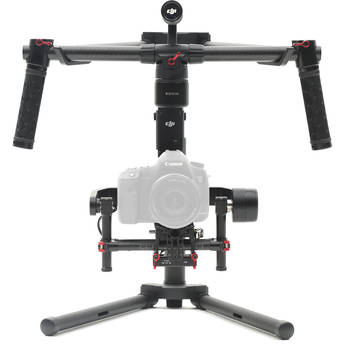
The makers of the remarkable drones, DJI, have released the next generation of professional digital camera stabilisation gimbals – the DJI Ronin-M 3 Axis Handheld Gimbal. Featuring many of the same capabilities as the original Ronin, the new model is lightweight, compact, and has increased rigidity and stability.
What’s great about the Ronin-M is the compact design-- it is small enough to fit into your backpack to be taken anywhere, yet strong enough to support any digital camera weighing up to 8 lbs. The upgraded ATS (Auto Tune Stability) technology is more precise, and completes the tuning and balancing process without any tools.
The magnesium frame of the Ronin-M makes it lightweight, enhancing the shooting experience, while maintaining easy maneuverability and increasing options. Other Features:
What’s great about the Ronin-M is the compact design-- it is small enough to fit into your backpack to be taken anywhere, yet strong enough to support any digital camera weighing up to 8 lbs. The upgraded ATS (Auto Tune Stability) technology is more precise, and completes the tuning and balancing process without any tools.
The magnesium frame of the Ronin-M makes it lightweight, enhancing the shooting experience, while maintaining easy maneuverability and increasing options. Other Features:
- Can easily switch between 3 modes of operation, without adjusting any setting or needing a 2nd operator remote
- Long battery life, with up to 6 hours of shooting
- Brushless motors for precision control and low vibration
- Optional second operator for impossible shots
- Mounts to any digital camera To learn more about the DJI Ronin-M 3-Axis handheld gimbal, visit our store: http://slrhut.co.uk/product/ID760C73/view
Tuesday, July 14, 2015
Fly your Drone like a Pro
Flying a drone is fun but much harder than it looks. Like in the case of using digital cameras, we’re all amateurs at first. New pilots need to start with the basics before learning how to really master their flying.
Here are some tips on how you can fly your drone like a pro:
Do not go to manual mode too fast
Manual mode is meant for expert flyers. Learn how to fly at low altitudes first until you understand manual mode and then start flying higher. When in manual mode, the systems put in place to help make flying easier will not provide the extra stability you need, and you’ll probably take poor-quality shots, making you discouraged before you really get into drone photography.
Be aware of the weather
Wind is the downfall of most copters. If you notice 15 - 30+ KPH winds outside, you will not want to bring your quadcopter for a flight. Although there are some drones that have automatic correction for windy conditions, it is a rule of thumb to always check the settings of your drone.
Use GPS mode if available
GPS provides great flight advantages that the beginner and advanced pilot will be able to take advantage of from their very first flight. GPS mode also provides the major benefit of knowing exactly where your copter is located. If a crash does occur, you will be able to find the wreckage much easier if GPS mode is active.
Keep controls simple
As a beginner pilot, the controls that you need master are up, down, left and right. It is never a good idea to try doing a roll or flip for the first time when you’re outdoors and the weather is bad. Keep all of your controls as simple as possible.
Becoming a pro drone pilot requires getting to know your equipment, conditions, and mastering the basics. For a more advanced set of drones, visit http://slrhut.co.uk/search/?keywords=drones&page=2
Here are some tips on how you can fly your drone like a pro:
Do not go to manual mode too fast
Manual mode is meant for expert flyers. Learn how to fly at low altitudes first until you understand manual mode and then start flying higher. When in manual mode, the systems put in place to help make flying easier will not provide the extra stability you need, and you’ll probably take poor-quality shots, making you discouraged before you really get into drone photography.
Be aware of the weather
Wind is the downfall of most copters. If you notice 15 - 30+ KPH winds outside, you will not want to bring your quadcopter for a flight. Although there are some drones that have automatic correction for windy conditions, it is a rule of thumb to always check the settings of your drone.
Use GPS mode if available
GPS provides great flight advantages that the beginner and advanced pilot will be able to take advantage of from their very first flight. GPS mode also provides the major benefit of knowing exactly where your copter is located. If a crash does occur, you will be able to find the wreckage much easier if GPS mode is active.
Keep controls simple
As a beginner pilot, the controls that you need master are up, down, left and right. It is never a good idea to try doing a roll or flip for the first time when you’re outdoors and the weather is bad. Keep all of your controls as simple as possible.
Becoming a pro drone pilot requires getting to know your equipment, conditions, and mastering the basics. For a more advanced set of drones, visit http://slrhut.co.uk/search/?keywords=drones&page=2
Wednesday, July 8, 2015
What You Need to Know when Buying Drones and Quadcopters
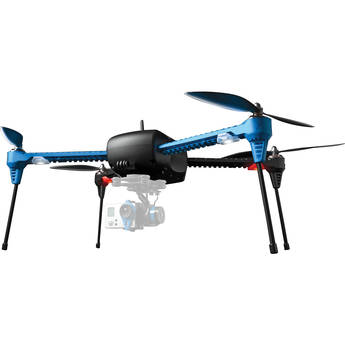
Drones and quadcopters give photos and videos new angles for
enthusiasts. They are fairly inexpensive, they capture high-definition photos,
and many new models are coming out.
Before buying a quadcopter, consider these features:
Camera
While former models have needed a separate video camera or
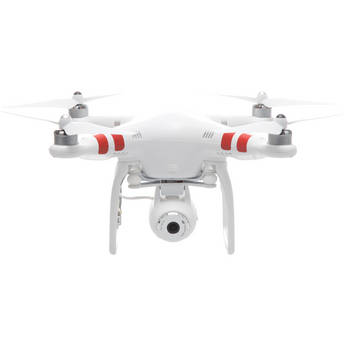
GoPro, there are models now that have built-in cameras like the DJI
Phantom 2 Vision+.
Built-in cameras are lighter than most other cameras and are
more functional. Other considerations are resolution, the ability for the
camera to be controlled, and the range of the camera.
Range
The range that you can control the drone is very important. Knowing
the range is not so vital for casual users, but if you want to take aerial
footage, you will need to know the range at which you can control your drone.
Live feed
There are models that transmit the live feed over Wi-Fi and
may be able to be viewed from the controller or on a computer, tablet, or
smartphone. Controllers that have an LCD display will often have a feed that is
sent and allows you to see what the drone camera is capturing. When there is no
live feed present, footage can often be stored on an SD card or flash drive.
Battery Life
Whether the quadcopter is for personal use or professional
use, such as in real estate, the last thing you want is for your drone to die
mid-flight. The average time for a quadcopter to be functional is around 15
minutes before it needs to be charged on ground or have the battery replaced.
Height and Speed
The point of having a drone is to
capture a larger scene in one frame, so height is important. Often times, the
speed of the drone will be 15 - 25 KPH. If you’re capturing a sports game,
speed is an even bigger factor.
Aside from these factors, consider the design, weight,
warranty, and replacement option for parts of your drone. For a wide selection
of drones and capabilities, you can visit http://slrhut.co.uk/search/?q=drones
Tuesday, June 23, 2015
Your Masterpiece in Vivid Details
Each DSLR camera has a variety of features that makes photography even more fun and creative. We choose a camera to buy and use based on our wants and needs. There are a lot of features to consider and one of the most important is the pixel count. Cameras with a large number of pixels are more sensitive to light and that can help to produce a better image quality. But which DSLR camera stands out from the rest in terms of jaw-dropping image quality?
The Nikon D810 offers a massive 36.3 effective megapixels to flawlessly capture every shot you’ll take. The clarity of detail and the rich colors in each photo is simply amazing with Nikon’s innovative EXPEED 4 image processing. It offers unsurpassed detail retention, noise-free images from ISO 64 to 12,800, and well-saturated skin tones. The D810 captures 5 fps at full resolution in FX format that widens the range of shooting situations.
This camera is perfect for still and multimedia photographers including professionals in landscape, studio, wedding, and portrait photography. Cinematographers and camera operators will surely love the D810 because of its accurate autofocus, smaller file formats, fast frame rates and image processing, and outstanding energy efficiency that will let them create their masterpiece. If you are looking for the best in DSLR image quality, choose Nikon D810. Purchase one now at SLRHut and check out other digital cameras in great prices.
The Nikon D810 offers a massive 36.3 effective megapixels to flawlessly capture every shot you’ll take. The clarity of detail and the rich colors in each photo is simply amazing with Nikon’s innovative EXPEED 4 image processing. It offers unsurpassed detail retention, noise-free images from ISO 64 to 12,800, and well-saturated skin tones. The D810 captures 5 fps at full resolution in FX format that widens the range of shooting situations.
This camera is perfect for still and multimedia photographers including professionals in landscape, studio, wedding, and portrait photography. Cinematographers and camera operators will surely love the D810 because of its accurate autofocus, smaller file formats, fast frame rates and image processing, and outstanding energy efficiency that will let them create their masterpiece. If you are looking for the best in DSLR image quality, choose Nikon D810. Purchase one now at SLRHut and check out other digital cameras in great prices.
Monday, June 22, 2015
The Intuitive DSLR Camera
Are you looking for your first entry-level camera? There are a lot to choose from and each one offers a feature you simply can’t ignore. Deciding which camera to buy is a big decision to make because we all know that DSLRs are expensive, so you want to make the right choice. Since you are starting out with photography, you want a camera that’s easy to use and understand without the lack of the features you want in a camera.
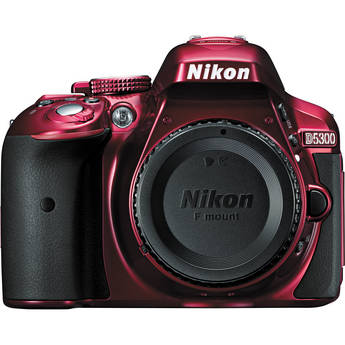
The Nikon D5300 is an entry-level camera and the successor to the Nikon D5200, with a few minor changes. This camera offers amazingly sharp and vivid details in photos thanks to its high pixel count of 24.2MP and EXPEED 4 processing engine that gives photos and videos an exquisite color. You can expect less noise, good tones and true blacks, even when shooting in low-light situations. Its ISO sensitivity ranges from 100 to 12800, and can extend up to ISO 25600 equivalent. The Nikon D5300 has built-in Wi-Fi that lets you share your photos with just a few easy steps, all you need is your camera and smart device.
With its 39-point AF system, you’ll never miss a good shot, even when your subject is not in the center of the frame. The Nikon D5300 has a vari-angle monitor that lets you be more creative in unique angles. Shoot from a low and high angle or take a selfie. Get creative with the Nikon D5300. You can choose from black, red, or gray models to match your style. Ready to order? Head on over to SLRHut for a great deal on the Nikon D5300 and other digital cameras as well.
The Nikon D5300 is an entry-level camera and the successor to the Nikon D5200, with a few minor changes. This camera offers amazingly sharp and vivid details in photos thanks to its high pixel count of 24.2MP and EXPEED 4 processing engine that gives photos and videos an exquisite color. You can expect less noise, good tones and true blacks, even when shooting in low-light situations. Its ISO sensitivity ranges from 100 to 12800, and can extend up to ISO 25600 equivalent. The Nikon D5300 has built-in Wi-Fi that lets you share your photos with just a few easy steps, all you need is your camera and smart device.
With its 39-point AF system, you’ll never miss a good shot, even when your subject is not in the center of the frame. The Nikon D5300 has a vari-angle monitor that lets you be more creative in unique angles. Shoot from a low and high angle or take a selfie. Get creative with the Nikon D5300. You can choose from black, red, or gray models to match your style. Ready to order? Head on over to SLRHut for a great deal on the Nikon D5300 and other digital cameras as well.
Monday, June 1, 2015
Your Handy Selfie Camera
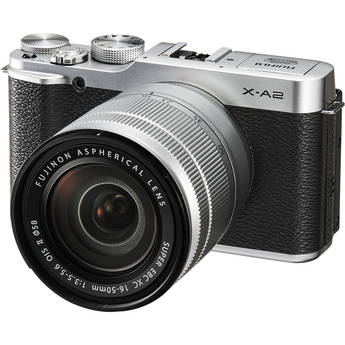
Ready to take selfies to a higher level? Fujifilm’s X-A2 is an entry-level, high performance compact digital camera designed to take better self-portraits. Its 175° tilting LCD screen with face and eye detection offers you ease and fun while you take snaps. Also, the Portrait Enhancer on the mode dial can enhance your skin making it look brighter and smoother. No need to retouch your makeup.
This camera offers much more too. Its excellent image quality will get you hooked on taking landscapes, macro shots, low-light, and flash photography. The Auto Macro function will let you capture small objects just 15cm away from the sensor to give them a larger perspective. X-A2 offers an intelligent AF that delivers fast focusing even in tricky situations, such as macro shots and in low-light conditions.
The multi-target auto area AF feature of the X-A2 lets you capture your subject easily. The camera uses multiple focusing points to identify your intended subject, making it stand out and blurring the rest. Lastly, Fujifilm’s X-A2’s wireless image transfer and insta share SP-1 printing makes sharing your photos easier. Don’t wait any longer, order your Fujifilm X-A2 today and start taking amazing selfie shots. Visit SLRHut now for the best deals on digital cameras!
This camera offers much more too. Its excellent image quality will get you hooked on taking landscapes, macro shots, low-light, and flash photography. The Auto Macro function will let you capture small objects just 15cm away from the sensor to give them a larger perspective. X-A2 offers an intelligent AF that delivers fast focusing even in tricky situations, such as macro shots and in low-light conditions.
The multi-target auto area AF feature of the X-A2 lets you capture your subject easily. The camera uses multiple focusing points to identify your intended subject, making it stand out and blurring the rest. Lastly, Fujifilm’s X-A2’s wireless image transfer and insta share SP-1 printing makes sharing your photos easier. Don’t wait any longer, order your Fujifilm X-A2 today and start taking amazing selfie shots. Visit SLRHut now for the best deals on digital cameras!
Saturday, May 16, 2015
The Tough Camera for Your Next Adventure
Ever wished for a camera that can handle extreme adventures without breaking? Look no further, because Olympus has engineered the Stylus Tough TG-850, a durable outdoor camera that’s waterproof ( to 33 feet), crushproof (to 220 pounds), freezeproof (to 10°C/14°F), and shockproof (to 7 feet) when the LCD flip screen is closed. And that’s just a few of its awesome features that will surely thrill you.
TG-850 has a tilting LCD monitor that makes capturing photos from unusual angles a whole lot easier. Mount it on your board or bike and take awesome action selfies. TG-850’s super-wide 21mm lens feature lets you capture more of what you are seeing. This panoramic feature is perfect for your outdoor adventures. Shoot a full HD 60p video and take photos in DSLR-quality.
What’s even more fun about TG-850? It provides an array of creative tools to enhance your photos and videos right away. From interval shooting to Art, Magic, and Picture filters to use, you can get really creative. Can’t wait to get your hands on this built to last camera? Head on over to SLRHut now for the best deals on digital cameras.
TG-850 has a tilting LCD monitor that makes capturing photos from unusual angles a whole lot easier. Mount it on your board or bike and take awesome action selfies. TG-850’s super-wide 21mm lens feature lets you capture more of what you are seeing. This panoramic feature is perfect for your outdoor adventures. Shoot a full HD 60p video and take photos in DSLR-quality.
What’s even more fun about TG-850? It provides an array of creative tools to enhance your photos and videos right away. From interval shooting to Art, Magic, and Picture filters to use, you can get really creative. Can’t wait to get your hands on this built to last camera? Head on over to SLRHut now for the best deals on digital cameras.
Wednesday, April 8, 2015
A New Perspective
Owning a quadcopter and using it to take shots around London is a very exciting thing to do. However, flying a drone takes skill; you will often have a few problems when you first start flying your drone. What you need to go on is training and guidance. Here are some tips regarding how to fly your drone so you can capture more videos effectively on your next session:
The Manual Mode
First rule: Do not go manual if you are not fully knowledgeable in flying your drone. The manual mode is meant for expert drone pilots. In the manual mode, the systems that are put in place to help you fly your drone easier will be disabled and you’ll lose the extra stability you need for flying. If you feel that the time has come for you to fly in manual mode, find a place that is safe for your drone.Mind the Wind
Wind is a common enemy of drones. If you notice that 8-15 kilometer per hour winds are blowing outside, it is advisable to not continue with your drone flying session. However, there are some copters with automatic corrections to adjust for wind conditions. As a general rule, always check your drone first and see if it’s fit for flying in strong windy conditions.Monday, March 16, 2015
See London from a Better Perspective
Drones have become more and more popular for photographers around the city. However, this excitement and popularity does not entice most people, especially the members of Scotland Yard who issued a warning to the new owners of drones not to fly their machines around central London.
But having this warning should not stop photographers and drone owners from capturing the city in its full beauty. Having a drone is not wrong, if you use it properly.
Always be aware of these regulations, and keep in mind that the rules are only there to keep everyone safe. Happy flying!
Area
When using your drones, you should first be focused on where you will fly it. Knowing the proper spots for drone use will help you capture videos and pictures without worrying about legal cases and concerns. You can only fly your drones that are within the line of your sight; that is usually 500 meters horizontally and 400 feet vertically. Also, you are not allowed to use your drone around the “line of sight” rule by enlisting the the help of spotters; the drone must be in the line of sight of the person directly controlling it. Flying your drone within 150 metres of any congested area and within 150 metres of an outdoor assembly of more than 1000 people is also not allowed.Always be aware of these regulations, and keep in mind that the rules are only there to keep everyone safe. Happy flying!
Tuesday, March 3, 2015
A Bird’s Eye View of London
The first thing you want to consider when you have a DJI Phantom 2 Quadcopter as part of your collection is where to fly it over. After all, you are the captain of your own Quadcopter and a photographer. There are many scenic views in London, and many tourist attractions that are worth hovering over using the Phantom 2. Snapping pictures or even recording quality videos from all angles and heights are a breeze and a joy to endeavour upon with this gadget in your hands.Top 3 Attractions Worth Capturing in Film
The hustle and bustle of the streets of London makes it difficult to capture photographs, especially if you want a clear view of your subject. With the new DJI Phantom 2, you can snap all the photographs you want while avoiding the inconvenience of a busy street. Here are the top attractions you shouldn’t miss:#1 Big Ben
It may sound cliché, but Big Ben is still the most popular attraction in the city. Taking the opportunity to film this famed landmark using the Phantom 2 is something no photographer should pass on.
#2 The London Eye
.
Another very famous monument that shouldn’t be missed is the London Eye. Due to its massive size, an aerial shot would be perfect to capture this landmark’s true beauty.
#3 The Tower of
London
The White Tower, which is considered to be the oldest part of the fortress, should be preserved in film from every angle possible.
No Fly Zone? No Worries!
As part of security measures, you cannot just fly your Phantom 2 in any area. There are no fly zones located all over the city, but you shouldn’t worry. One of the best and unique features of the DJI Phantom 2 Quadcopter is its ability to prevent accidental flights in restricted areas. This just proves that the Phantom 2 is definitely worth adding your arsenal of digital cameras.Wednesday, February 18, 2015
Flight at Your Fingertips
The dream of flying over scenic views and capturing these sights has not only been made possible but easy, too. The DJI Phantom 2 Quadcopter takes photography to new heights, literally. With the prominent feature of smooth stabilized footage, attributed to the H3-2D or H3-3D gimbal, it is perfect for aerial cinematography and videography. Because the Phantom 2 is lightweight and durable, this new gadget is travel-friendly and the best companion for the adventurous photographer.
● Long-Lasting Smart Battery With up to 25 minutes of flight time due to the high performing 5200mAh Lithium Polymer battery, the device provides its own maintenance reminders. The battery is a very safe and reliable feature of the Phantom 2.
● Upgraded Remote Control A gimbal control dial, trainer port, built-in rechargeable LiPo battery, and throttle locking features come with the new remote control system.
● Improved Power New motors and propellers give the Phantom 2 greater thrust and control during flight. With this added feature, more equipment can be added to the Quadcopter and the flight power will not be compromised.
● New Compass A new anti-static compass was developed for easy navigation and its protective shell provides protection during any flight condition.
● Easy Battery Replacement An integrated battery compartment makes it possible to change batteries in a matter of seconds.
Soar the skies of London with your very own DJI Phantom 2 Quadcopter and take magnificent photographs to show the world and share the beauty that is truly British.
DJI Phantom 2 Features
Being the pilot of your own DJI Phantom 2 is full of excitement and thrills. The intelligent system has unbelievable features that will impress any budding photographer who is looking to update their collection of digital cameras and gadgets.● Long-Lasting Smart Battery With up to 25 minutes of flight time due to the high performing 5200mAh Lithium Polymer battery, the device provides its own maintenance reminders. The battery is a very safe and reliable feature of the Phantom 2.
● Upgraded Remote Control A gimbal control dial, trainer port, built-in rechargeable LiPo battery, and throttle locking features come with the new remote control system.
● Improved Power New motors and propellers give the Phantom 2 greater thrust and control during flight. With this added feature, more equipment can be added to the Quadcopter and the flight power will not be compromised.
● New Compass A new anti-static compass was developed for easy navigation and its protective shell provides protection during any flight condition.
● Easy Battery Replacement An integrated battery compartment makes it possible to change batteries in a matter of seconds.
Soar the skies of London with your very own DJI Phantom 2 Quadcopter and take magnificent photographs to show the world and share the beauty that is truly British.
Saturday, January 24, 2015
Gearing Up for Winter Photography
The winter season offers a lot of opportunities for both beginners and professional photographers to improve their skills. With the blessing of snow, everything outside will be blanketed by the stuff, which gives photographers a treat of capturing wonderful images. However, practicing photography in winter is not that simple. Starting from you to your tools and equipment, everything must be in tip-top shape to be able to brave the weather. Here are some guidelines on how to be geared enough before you start your photography session:
Rule number one is to keep your SLR camera cold. Contrary to popular belief, keeping your camera warm all throughout the session would be a disadvantage to you. When you constantly keep your camera in a warm place then take it out to shoot, moisture would develop that could potentially harm your camera. Also, keep your gear accessible to save you time and effort while being outside. Have a bag, regardless if it’s a backpack or an actual camera bag, and make sure that you can easily reach for your gear with little effort from these bags.
By following these simple tips, you avoid some of the common pitfalls of winter photography and set yourself up to enjoy capturing the beauty that the winter season has to offer.
Dress Up before You Get Down in the Snow
Of course, it is a common rule to wear heavier clothes during this season and venturing out on a photo shoot is no exception. First, wear warm, waterproof boots to help you trek through snow. Second, contrary to the general thinking for clothing in winter, don’t overdress when you are going on a photography trip this winter. Over-dressing would not permit you move comfortably while taking pictures. Just wear clothes that would keep you warm enough to let you stay longer outdoors.
Camera Care and Easy Access Equipment
Rule number one is to keep your SLR camera cold. Contrary to popular belief, keeping your camera warm all throughout the session would be a disadvantage to you. When you constantly keep your camera in a warm place then take it out to shoot, moisture would develop that could potentially harm your camera. Also, keep your gear accessible to save you time and effort while being outside. Have a bag, regardless if it’s a backpack or an actual camera bag, and make sure that you can easily reach for your gear with little effort from these bags.
By following these simple tips, you avoid some of the common pitfalls of winter photography and set yourself up to enjoy capturing the beauty that the winter season has to offer.
Tuesday, January 20, 2015
Tips and Tricks on Winter Photography
Proper clothes? Check! Warm boots? Check! Easy-access pockets on bags for your gear? Check! Now, you are ready and well-prepared to start taking beautiful shots outdoors. Winter photography is not just taking pictures. It is all about having the right skills and practice while being outdoors with your SLR camera. But what if you are just starting with photography and you want to try your hand at winter photography? Here are some tips and tricks on how to take great shots in snow:
Take Raw Shots
Although some older camera models have difficulties with taking pictures in RAW, it is advisable to capture images in RAW format if possible. This provides you with more options in post-production and will allow you to fix problems easily that are difficult (or impossible) to fix in the JPEG format.Just Keep on Shooting
As simple as it may sound, you should never delete images while you are still in the field. There are times when some shots, whether intentionally or accidently taken, seem weak when you first see it in the field but turn out to be a perfect shot once viewed on a desktop. So be sure to pack extra memory cards, especially if you’re shooting RAW..A Little Exposure Won’t Hurt
Winter photography is basically focused on one thing: the snow. To make the snow look more beautiful on your images, slightly overexpose it by using a gray card and setting a custom white balance.Be on Manual
If you’re using an SLR camera, you can shift the settings of your camera to manual. Using Auto mode will result in darker images due to the camera focusing on the bright light that’s reflected from the snow. You can overcome this by shooting in manual mode. These tips should provide a good point to start when taking snaps in the snow. Don’t be afraid to get creative and enjoy beauty that is the snowy season.Tuesday, December 30, 2014
How to Take Good Photos Indoors
In photography, good lighting is very important in capturing images. It’s no surprise why a beginner would struggle when it’s a challenge for even the seasoned photographer to produce good shots indoors. Not only is the amount of light reduced but the quality, temperature, and position of the light source really comes into play as well. So, if you’ve ever struggled with blurry, yellowish or dimly lit indoor photos, here are some tips for you:
When taking snaps indoors, it is important to settle on one light source. The combination of natural and artificial light can cause photos to be blurry, hazy or yellowish. If you really need to include an additional light source, like a lamp or a ceiling fixture, remember to adjust your camera’s white balance.
Unfortunately, your pop-up flash will only fall flat, creating undesirable hot spots and flattening the depth of the photo. On the other hand, external flashes provide the kind of versatility that allows light to be scattered evenly about the room, bringing a more natural feel. When an external flash is not available, utilising ambient light is the next best thing.
Being aware of not only the quantity but the quality and direction of the light available indoors is the best way to guarantee a good shot. Photography is fun. Get creative. Purchase your own camera now! Enjoy shopping for digital cameras at SLRHut.
When taking snaps indoors, it is important to settle on one light source. The combination of natural and artificial light can cause photos to be blurry, hazy or yellowish. If you really need to include an additional light source, like a lamp or a ceiling fixture, remember to adjust your camera’s white balance.
Unfortunately, your pop-up flash will only fall flat, creating undesirable hot spots and flattening the depth of the photo. On the other hand, external flashes provide the kind of versatility that allows light to be scattered evenly about the room, bringing a more natural feel. When an external flash is not available, utilising ambient light is the next best thing.
Being aware of not only the quantity but the quality and direction of the light available indoors is the best way to guarantee a good shot. Photography is fun. Get creative. Purchase your own camera now! Enjoy shopping for digital cameras at SLRHut.
Wednesday, December 17, 2014
Keep It Good as New
Congratulations, you’ve got your new digital SLR camera. Now what? Well, while people may be sharing their wisdom on how to use it properly, don’t forget about the proper care and protection of it. Needless to say, a digital SLR camera is a valuable device that requires maintenance. Your actions, how you carry and handle it, are important. Here are a few tips:
Dust, sand, and water may cause problems for your device. Make sure to keep your camera away from these elements. Consumer or entry level models are more likely to be affected by these problems. Avoid leaving your camera anywhere--including your camera bag--for long periods of time without the lens or the body cap attached to it; otherwise, you risk damage to the sensor or lens.
The body and the lens will eventually accumulate dust. Clean them with a blower or a microfiber cloth. Never rub the lenses. If you need to, try using a hand-held blower then gently wipe away the remaining dirt. Always remember not to remove the lens from your camera’s body in a polluted environment. Change it quickly with the camera lens mount facing down.
Taking good care of your camera can maintain its high performance for a long time. Now, go around and enjoy using your new camera. Capture beautiful moments, and if ever you need to upgrade, SLRHut has the digital cameras with the best deals.
Dust, sand, and water may cause problems for your device. Make sure to keep your camera away from these elements. Consumer or entry level models are more likely to be affected by these problems. Avoid leaving your camera anywhere--including your camera bag--for long periods of time without the lens or the body cap attached to it; otherwise, you risk damage to the sensor or lens.
The body and the lens will eventually accumulate dust. Clean them with a blower or a microfiber cloth. Never rub the lenses. If you need to, try using a hand-held blower then gently wipe away the remaining dirt. Always remember not to remove the lens from your camera’s body in a polluted environment. Change it quickly with the camera lens mount facing down.
Taking good care of your camera can maintain its high performance for a long time. Now, go around and enjoy using your new camera. Capture beautiful moments, and if ever you need to upgrade, SLRHut has the digital cameras with the best deals.
Wednesday, November 26, 2014
A Picture-Perfect Holiday
The holiday season always brings a feeling of relaxation and warmth. You can return to a distant hometown or go on an adventure to new destinations. A great trip, though, is never complete without a camera. The technology of photography gives us the option to preserve and keep memorable sights and moments as well as share them with other people in the form of pictures.
Capturing great photographs takes some skill but that does not mean that newbies cannot master this art form. With these photographer starter tips from SLRHut, you can start maximizing your holiday by capturing wonderful photographs.
Whenever you are taking pictures, always assess your location to make sure it is properly exposed and well-lit. When on holiday, photographers tend to use natural light for their pictures. Always make sure that the light is not at the back of your subject but in front. There are also certain camera settings to be aware of when it comes to lighting, such as ISO. Lower the ISO setting when the subject is still and you have a large amount of light around you. Set the ISO higher when the subject is in motion or if it’s dark.
Of course, for you to do any of this, you need to have the right tools. With SLRHut’s exciting camera offers, you’ll have your pick of many digital cameras… and you won’t have to break the bank to get the toy of your choice.
The Essence of Proper Lighting
Taking pictures is all about the importance of exposure. You take your camera to capture images and scenes, to let these images be seen in a new light. With the concept of exposure comes the importance of lighting.Whenever you are taking pictures, always assess your location to make sure it is properly exposed and well-lit. When on holiday, photographers tend to use natural light for their pictures. Always make sure that the light is not at the back of your subject but in front. There are also certain camera settings to be aware of when it comes to lighting, such as ISO. Lower the ISO setting when the subject is still and you have a large amount of light around you. Set the ISO higher when the subject is in motion or if it’s dark.
Keep Moving
Grab the opportunity to go outside and take pictures when you are away on holiday. You may relax and rest during that time, but know that the world is waiting to be captured by you. Go around and explore! Always have a camera with you so as to be prepared to capture the moment.Of course, for you to do any of this, you need to have the right tools. With SLRHut’s exciting camera offers, you’ll have your pick of many digital cameras… and you won’t have to break the bank to get the toy of your choice.
Friday, November 21, 2014
Get the Most Out of Black Friday
Even before the kids in the house eat all of
their Halloween candy, both stores and customers are prepping for a very big
event: Black Friday. Black Friday is the day of the year when shopping malls
open their doors wide and flash big signs for shoppers to get great deals on
items. Happening on the day after Thanksgiving, Black Friday has grown to be a
huge event, pulling shoppers to camp outside the stores and wait in line for
hours. Want to be part of this great shopping event? Here are some tips on what
to do so your shopping spree is safe and worthwhile.
The Key is Planning
As simple as it seems, you need to do a lot of
planning when you want to participate in the Black Friday madness. You can save
yourself from a huge amount of stress just by simply planning ahead. One
example is the apps now available for you to download. These apps will help you
browse the available early-bird and night-owl promos, find store hours, and
browse all the best Black Friday deals. Another example is to go to the store
before the big day arrives to try on some clothes or have a test on some
gadgets so you’ll know what to get on Black Friday.
Know What to Buy
Although Black Friday is all about bargained
products and lower prices, some products are not as great of a deal as other
products. For example, a store offers sheets and linens for Black Friday, but
those products are usually offered for a very low price during the January
White Sales. Prioritise your buying; Black Friday is typically better for
buying electronics and gadgets like TVs, laptops, digital cameras, and more.
Of course, if you want to make things even
easier for yourself, you may want to consider doing your Black Friday shopping
online. With online e-commerce sites for consumer electronics like SLRHut to
serve your needs, the convenience is clear!
Subscribe to:
Posts (Atom)